

 Global
 Argentina
 Chile
Chile Colombia
 Mexico
 Peru
Peru Remote
 Superpower AI
When you publish jobs as a company on Get on Board, a complete company profile helps us understand your organization and keep your account information ready for recruiting workflows. Your company profile includes fields such as industry and company headcount, and Get on Board may ask you to complete them from the dashboard when they are missing.
These details add useful context for classification and company profile completeness. They do not, by themselves, guarantee a better ranking, a higher position in Get on Board results, or automatic visibility on LinkedIn.
What to complete
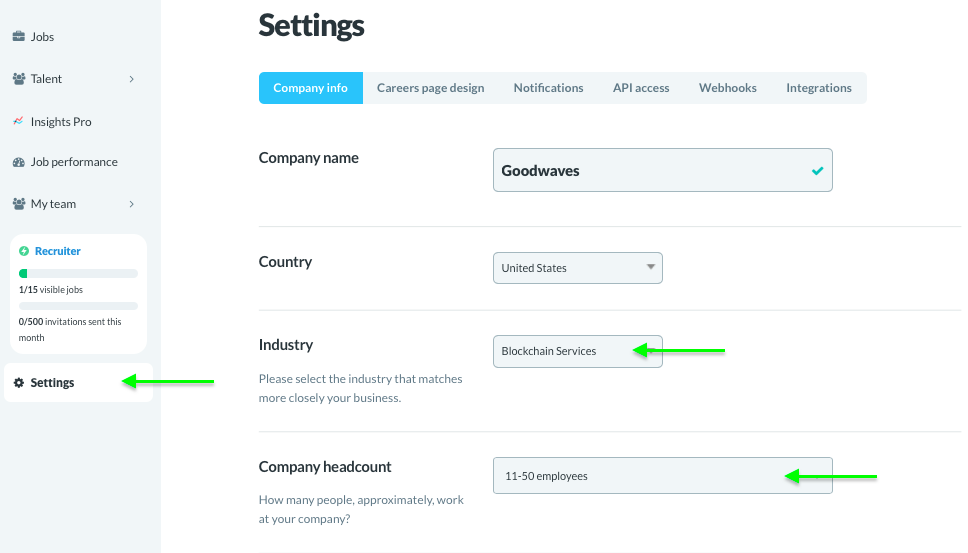
In Settings → Company info, review and complete the company details your team uses across Get on Board:
- Industry: the business area that best matches your company.
- Company headcount: the approximate number of people who work at your company.
- LinkedIn company page: the LinkedIn page for your organization, if you want to use LinkedIn-related visibility features.
If you have an admin role, go to Settings → Company info in the left-side menu and add the missing data there.
Why Get on Board asks for industry and headcount
Industry and headcount help keep your company profile complete and easier to classify. If either field is missing, Get on Board can show a prompt in your dashboard asking you to fill it in.
Completing these fields is a good housekeeping step before publishing or managing jobs, especially if several people on your team use the same company account.
What this does not change automatically
Adding industry or headcount does not automatically improve a job’s position in search results, job lists, or external channels. Job visibility can depend on many other product rules, publication status, paid visibility options, moderation, and the destination platform’s own criteria.
For LinkedIn specifically, industry and headcount are not enough to make jobs appear through the automatic feed. Get on Board only includes eligible jobs in the LinkedIn feed when the company has a LinkedIn Company ID configured. If that ID is missing, jobs are skipped from the feed to avoid assigning them to the wrong company.
If your goal is LinkedIn visibility
Start by adding your LinkedIn company page in Settings → Company info. Get on Board can then confirm or configure the numeric LinkedIn Company ID needed for the feed.
Once the Company ID is set, only eligible jobs can be sent to LinkedIn. LinkedIn still decides which jobs it accepts and displays, so automatic feed setup does not guarantee that every job will appear there.
 More from Promotion and visibility

 Sign in with Google
